Self-hosted platforms
Lekhamint
A private, self-hosted money manager.
Expenses, budgets, bills and reports in an offline-first Android app and a web app, backed by one Go binary.
Why I built it
I wanted to track money exactly, to the paisa, without giving a finance app my bank data. It works offline and syncs through a tiny server I run.
Architecture
How it fits together
Android
Offline-first app
full copy of the books
Sync server
One Go binary
hybrid logical clocks
Web
Web app
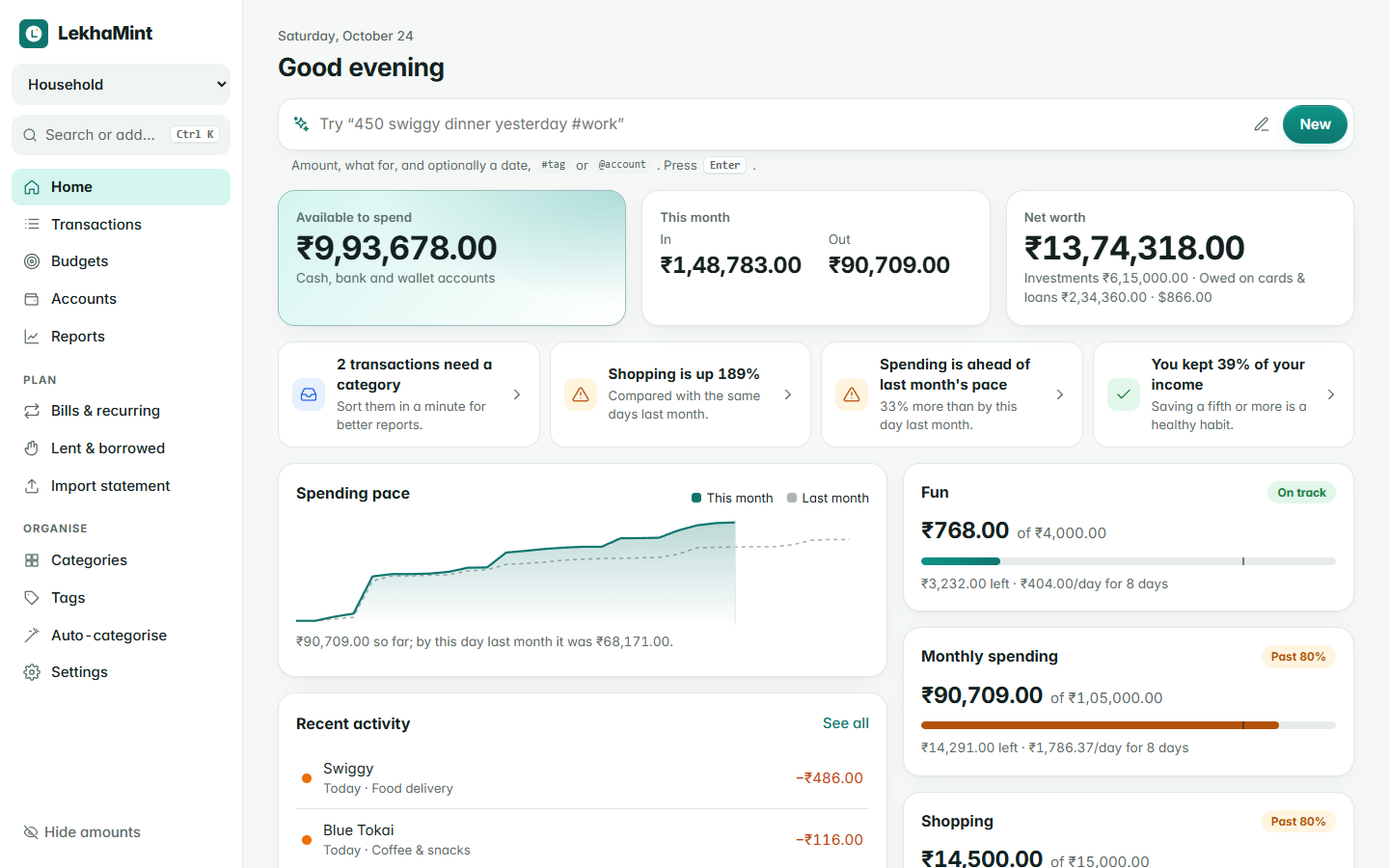
quick add in plain words
Screenshots
See it in use
Documentation
From the README
LekhaMint
A modern, private money manager you host yourself.
Android app, web app and a tiny sync server. Exact to the paisa, works offline, no cloud, no tracking.
Live demo · Install · Docs · Download
Lekha (लेखा) means "account" or "record": LekhaMint keeps a clear, exact record of your money.
Try it now
Open the live demo and sign in with demo@example.com / demo1234. It is the real server compiled to WebAssembly, running in your browser on a year of sample household data. Nothing is sent anywhere, and it resets when you reload.
Features
- Fast entry. Add an expense in about five seconds: a calculator keypad on Android, and quick add in plain words on the web (
450 swiggy dinner yesterday #work @hdfc). - Correct accounting. Transfers and card payments are not spending, refunds reduce spending, and loans to friends never count as income or expense. Balances are always calculated from transactions, never typed in.
- Budgets per category or account, weekly to yearly, with rollover, a daily allowance and a pace warning.
- Reports: category breakdown, 12-month trend, needs/wants/savings, income sources, top payees and tags.
- Bills & recurring items that remind you or record themselves, without duplicates across devices.
- Lent & borrowed with partial repayments and due dates.
- Multi-currency accounts, transfers between currencies, and totals converted with your own exchange rates.
- Splits, tags and auto-categorise rules that also clean up messy payee names.
- Bank statement import (CSV): importing the same file twice adds nothing.
- Family sharing with owner, editor and viewer roles; see and sign out devices.
- Android app that works fully offline, with a home-screen widget, quick settings tile, app lock, hide amounts, Material You and true-black themes, and encrypted automatic backups.
- Web app with a command palette (Ctrl/⌘ K), keyboard shortcuts, insights and a spending-pace chart. It installs like an app.
- Self-hosting made easy: one small program or one Docker image, SQLite built in (PostgreSQL optional), automatic backups, health checks and structured logs. It runs happily on a Raspberry Pi.
Install
The server includes the web app. Run one of these on the computer that will host it, then open the address it prints and create your account.
Linux and macOS
curl -fsSL https://raw.githubusercontent.com/anand34577/lekhamint/main/install.sh | sh
Windows (PowerShell; run as Administrator to start it with Windows)
irm https://raw.githubusercontent.com/anand34577/lekhamint/main/install.ps1 | iex
Docker
docker run -d --name lekhamint --restart unless-stopped -p 8080:8080 -v lekhamint-data:/data ghcr.io/anand34577/lekhamint:latest
or with Compose: curl -fsSLO https://raw.githubusercontent.com/anand34577/lekhamint/main/docker-compose.yml && docker compose up -d. No Docker yet? curl -fsSL https://get.docker.com | sh, or add --docker to the Linux one-liner and it installs Docker for you.
The installers check the download's SHA-256, set up a service that starts on boot and restarts on failure, and upgrade in place when you run them again. Details, options and manual installs: Installation · Docker · HTTPS and remote access · Configuration.
Android: download LekhaMint.apk from the latest release and install it. Use it on its own, or connect it to your server under More → Sync (guide).
How it fits together
  Android app (offline-first)           Web app (any browser)
            │                                    │
            └────────── sync over HTTPS ─────────┘
                              │
                 LekhaMint server (Go, one binary)
                 SQLite or PostgreSQL · daily backups
Every device keeps a full copy of the books and syncs changes through your server with hybrid logical clocks, so it works offline and never creates duplicates. Amounts are integers in minor units (paise, cents); floating point is never used for money.
| Part | Folder | Built with |
|---|---|---|
| Server | server/ | Go, SQLite (pure Go) or PostgreSQL; serves the web app; also compiles to WebAssembly for the demo |
| Web app | web/ | React, TypeScript, TanStack Query, Vite |
| Android app | android/ | Kotlin, Jetpack Compose, Room, WorkManager |
Documentation
- Wiki: installing, configuring, using, backing up, upgrading and troubleshooting.
- Design notes: the product, how personal finance is modelled, architecture, data model, sync protocol, backups and the HTTP API.
- Changelog.
Development
cd server && make demo                 # server with sample data on :8080 (demo@example.com / demo1234)
cd web && npm ci && npm run dev        # web app with hot reload on :5173
cd android && ./gradlew assembleDebug  # Android app
Tests: make test in server/ (set LEKHAMINT_TEST_PG_DSN to include PostgreSQL), npm test in web/, ./gradlew testDebugUnitTest in android/. CI runs all of them, builds the Docker image and tests the Linux installer on every pull request. See Building from Source and CONTRIBUTING.md.
Security and privacy
No telemetry, no analytics, no third-party calls. Passwords use Argon2id, sessions are stored hashed, and Android backups are encrypted. Please report vulnerabilities privately: see SECURITY.md. The full privacy policy explains what the apps store and when data leaves your device.
Self-hosted platforms