Self-hosted platforms
Repoman
An artifact repository in a single binary.
Host and proxy Maven, npm, PyPI, Docker, Go, APT, YUM, Conda and raw files. Air-gap friendly, with no JVM or external database.
Why I built it
Build machines on locked-down networks still need Maven, npm, PyPI and Docker. The usual tools are heavy for that, so I wrote one binary that hosts and caches all of them.
Architecture
How it fits together
Build tools
Maven, Gradle
npm, pip, go
docker
apt, yum
RepoMan
Hosted repositories
Proxy caches
Deduplicated blob store
SQLite
Upstream, optional
Maven Central
npmjs, PyPI
Docker Hub
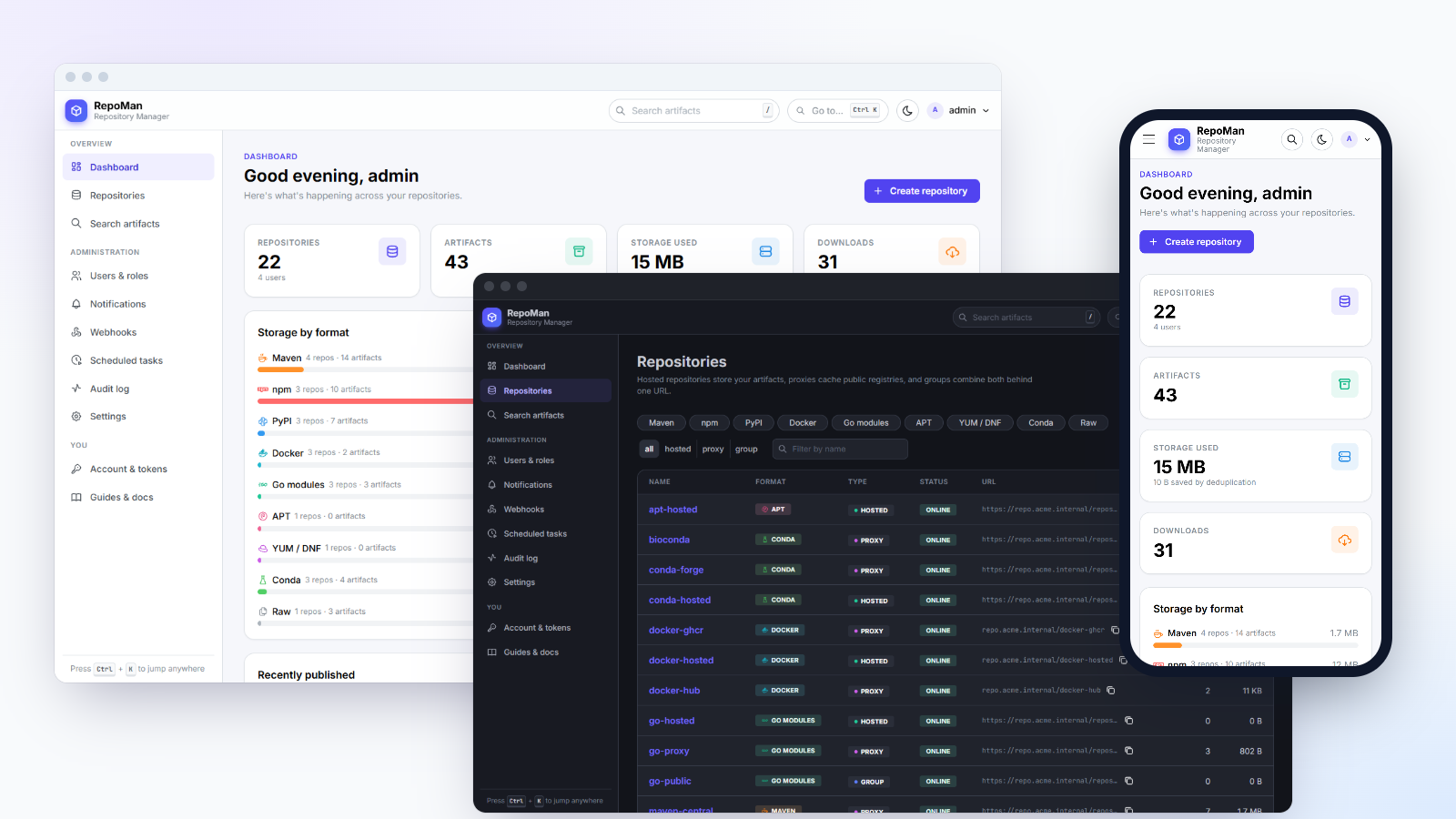
Screenshots
See it in use
Documentation
From the README
A self-hosted artifact repository manager in a single binary. Host your own builds, cache the public registries, and give every tool one URL to pull from — for Maven, npm, PyPI, Docker, Go, APT, YUM, Conda and plain files.
RepoMan is one static Go executable with the web UI embedded, a SQLite database and a deduplicating blob store on disk. There is nothing else to install: no JVM, no external database, no Redis, no object store.
- Runs where the internet doesn't. RepoMan contacts only the upstream registries you configure (and your own SSO, webhook and notification servers). No telemetry, no update checks, no CDN: the UI's fonts, icons and scripts ship inside the binary, and a content security policy enforces it. Build machines need a route to RepoMan and nothing else. See Firewalls and air-gapped networks.
- Runs anywhere. Linux, macOS and Windows on x86-64 and ARM (including Raspberry Pi), as a system service or a container.
- Secure by default. No default password, scoped API tokens, per-repository access, signed APT/YUM indexes, an audit log, and a sandbox for everything it serves. See Security.
Downloads for every platform are on the Releases page. See CHANGELOG.md for what changed in each release.
Features
|---|---|
| Formats | Maven · npm · PyPI · Docker/OCI (also Helm charts over OCI) · Go modules · APT · YUM/DNF · Conda · raw files |
| Repository types | Hosted (your builds), proxy (a caching mirror of a remote), group (several repositories behind one URL) |
| Storage | Content-addressed: identical files are stored once. Quotas, cleanup policies with dry-run preview, integrity check |
| Resilience | Proxies keep serving cached content when the upstream is down, and tell you when it goes down and comes back |
| Access control | Viewer / developer / admin roles, per-repository overrides, private repositories, optional anonymous read |
| Sign-in | Local accounts, OpenID Connect single sign-on (Keycloak, Entra ID, Okta, Authentik, Google…), brute-force lockout |
| API | REST API under /api/v1 for everything the UI does; tokens scoped to read-only, read & publish, or full access |
| Notifications | Push messages through Gotify; HMAC-signed webhooks for automation |
| Operations | Prometheus metrics, health probe, scheduled maintenance tasks, configuration export/import, built-in TLS |
| UI | Guided repository wizard, copy-paste client setup for every tool, search, command palette (Ctrl+K), light/dark |
Format support in detail:
| Format | Hosted | Proxy | Group | Clients |
|---|---|---|---|---|
| Maven | ✓ | ✓ | ✓ merged maven-metadata.xml | mvn, Gradle, sbt |
| npm | ✓ publish, login | ✓ | ✓ | npm, pnpm, Yarn, Bun |
| PyPI | ✓ twine / poetry upload | ✓ | ✓ merged index | pip, uv, Poetry |
| Docker / OCI | ✓ push, pull, layer dedupe | ✓ Docker Hub, GHCR, Quay… | ✓ pull | docker, podman, containerd, Kubernetes, helm (OCI) |
| Go modules | ✓ upload .mod / .zip | ✓ incl. checksum database relay | ✓ merged versions | go |
| APT | ✓ .deb, GPG-signed indexes | ✓ Debian, Ubuntu | — | apt |
| YUM / DNF | ✓ .rpm, signed repodata | ✓ Rocky, Alma, EPEL… | — | dnf, yum |
| Conda | ✓ .conda / .tar.bz2, generated repodata | ✓ conda-forge, bioconda, Anaconda | — | conda, mamba, micromamba, pixi |
| Raw | ✓ any file | ✓ | ✓ | curl, wget, anything HTTP |
Quick start
Pick one. In every case RepoMan then listens on http://localhost:8081.
Linux and macOS: one line (downloads the right build, verifies its checksum, installs it as a service)
curl -fsSL https://raw.githubusercontent.com/anand34577/repoman/main/scripts/get.sh | sudo sh
Run it again to upgrade (the database is backed up first); ... | sudo sh -s -- rollback undoes an upgrade and
... | sudo sh -s -- migrate-from /path/to/data adopts existing data. See
Installation.
Docker
docker run -d --name repoman -p 8081:8081 -v repoman-data:/data ghcr.io/anand34577/repoman:latest
docker logs repoman        # shows the generated admin password
Linux (systemd service, runs as its own unprivileged user)
tar -xzf repoman_<version>_linux_amd64.tar.gz && cd repoman_<version>_linux_amd64
sudo ./install.sh
sudo cat /var/lib/repoman/initial-admin-password
macOS (launchd service)
tar -xzf repoman_<version>_macos_arm64.tar.gz && cd repoman_<version>_macos_arm64
sudo ./install.sh
Windows (service; run in an elevated PowerShell)
Expand-Archive repoman_<version>_windows_amd64.zip -DestinationPath . ; cd repoman_<version>_windows_amd64
Set-ExecutionPolicy -Scope Process Bypass -Force
.\install.ps1 -OpenFirewall
Just try it (any OS, no installation: data goes to ./data)
./repoman
Download archives from the releases page. Use arm64 for
Apple silicon, Raspberry Pi 4/5 and other 64-bit ARM machines, armv7/armv6 for 32-bit Raspberry Pi OS.
First sign-in
- Open http://localhost:8081 and sign in as
admin. The password was generated on first start; it is printed once in the log and stored ininitial-admin-passwordin the data directory. - Change the password (Account). The password file is deleted when you do.
- Follow the checklist on the dashboard: set the public URL, create a token, connect a client.
A fresh installation already contains a typical set of repositories for every format — for example
npm-hosted (your packages), npm-proxy (a cache of npmjs.org) and npm-public (both behind one URL).
Open a repository and its Setup tab gives you copy-paste configuration for each client.
Forgot the admin password? Run repoman reset-password on the server (details).
Before others use it: serve RepoMan over HTTPS. Either set
RM_TLS_CERT/RM_TLS_KEYor put it behind a reverse proxy; both are described in Configuration. Docker and several other clients refuse plain HTTP for anything butlocalhost.
Documentation
|---|---| | Installation | Every platform step by step, services, Docker, upgrading, uninstalling | | Configuration | Settings reference, HTTPS, reverse proxies, logging, outbound proxy | | Firewalls and air-gapped networks | Exactly what RepoMan connects to, per upstream | | Repositories and formats | Hosted / proxy / group, per-format client setup and edge cases, cleanup, quotas | | Security | Roles, token scopes, SSO, hardening checklist, what is stored where | | Notifications and webhooks | Gotify setup, webhook payloads, the event catalogue | | REST API | Authentication, every endpoint, examples | | Operations | Backup and restore, monitoring, maintenance tasks, password recovery, moving servers | | Troubleshooting | Symptoms and fixes, by client |
The same guidance, tailored to your server's address, is in the UI under Guides & docs.
Configuration at a glance
Process settings come from environment variables, a repoman.env file next to the binary, or flags.
Everything else is configured in the UI or through the API.
| Variable | Default | Purpose |
|---|---|---|
RM_ADDR | :8081 | Listen address |
RM_DATA_DIR | data | Database and artifacts. Back this up. |
RM_ADMIN_PASSWORD | (random) | Admin password for the first start only |
RM_TLS_CERT, RM_TLS_KEY | — | Serve HTTPS directly |
RM_TRUSTED_PROXIES | loopback | Reverse proxies whose X-Forwarded-* headers are believed |
RM_LOG_FILE | — | Also log to a rotated file |
RM_ACCESS_LOG | true | Log every request |
Full reference: docs/configuration.md.
Building from source
Requires Go 1.26+ and Node.js 22+.
npm --prefix frontend ci && npm --prefix frontend run build   # UI → backend/ui/dist (embedded)
go -C backend build -o ../repoman .                           # → ./repoman
go -C backend test ./...                                      # end-to-end tests for every format
make build, make test and make release wrap the same commands. See CONTRIBUTING.md
for the development workflow and the code layout.
Known limits
RepoMan aims to do the common things well with very little machinery. What it deliberately does not do (yet):
- One node, local disk. No clustering, replication or S3 storage. Scale up, snapshot the volume, back up the directory.
- APT and YUM cannot be grouped: their signed indexes cannot be merged. List several sources in the client instead.
- Conda cannot be grouped: public channel indexes are too large to merge per request. List several channels in
.condarc. - npm:
unpublish,deprecate,dist-tagandnpm searchare not implemented; delete versions in the UI.npm auditis not proxied. - Proxies download a file completely before serving it the first time; very large first downloads start with a pause.
- No vulnerability scanning, no LDAP/SAML (use OIDC), and SSO does not map provider groups to roles.
- Secrets in the database are not encrypted at rest (upstream passwords, the signing key); protect the data directory with file permissions and disk encryption. See Security.
Self-hosted platforms