Self-hosted platforms
Docveta
Document management with OCR on GPU, NPU or CPU.
Capture, OCR, organise and search bills, IDs and records, with Spaces, OIDC SSO, optional AI Q&A and an Android app.
Why I built it
A household's bills, IDs and certificates end up in five different places. I wanted one searchable home for them, with OCR on whatever hardware I have.
Architecture
How it fits together
Capture
Web upload
Android app
Inbox
Docveta
OCR
GPU, NPU or CPU
Spaces and permissions
Search and AI Q&A
Storage
Files on your disk
Database
Screenshots
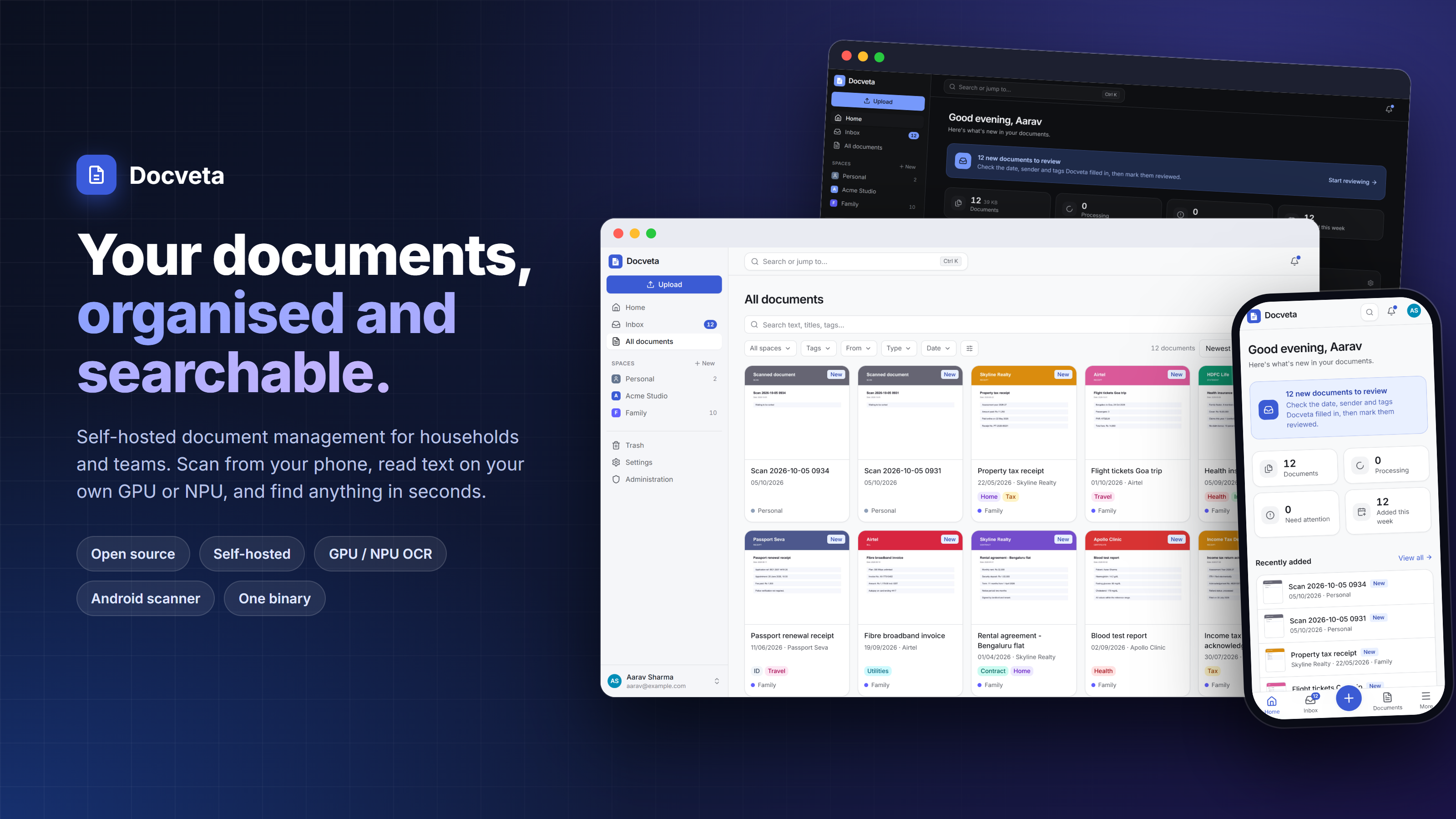
See it in use
Documentation
From the README
Your documents, organised and searchable. Docveta is a lightweight, self-hosted document management system for households, small organisations and teams. Capture bills, IDs, contracts, certificates and records from any device; Docveta reads the text (on your graphics card, an NPU or the CPU), organises them, and finds them in seconds.
- Simple to use, full-featured underneath — Inbox-first workflow, search-as-you-type, saved views, bulk edit, notes with @mentions, trash, history.
- Spaces — Personal, Family, Accounts, Client X… one easy permission model (owner / editor / viewer).
- OCR on GPU, NPU or CPU — the bundled PaddleOCR engine uses any Windows GPU (integrated or external, via DirectML), NVIDIA CUDA, Apple GPU/Neural Engine, NPUs, and falls back to the CPU. Also Rockchip RK3588/RK3576/RK3566 NPUs and Tesseract (100+ languages). Engines are pluggable: add your own in ~100 lines.
- Works without OCR too — born-digital PDFs are searchable immediately.
- Search that understands Indic scripts and IDs — Unicode-aware indexing, typo
tolerance,
tag:/from:/date:filters, highlighted snippets with page numbers. - Single sign-on (OIDC) in the web and Android apps, two-step sign-in, API tokens, audit log.
- Ask your documents (optional AI, any OpenAI-compatible server incl. Ollama): cited answers, meaning-based search (pgvector when installed), suggestions for tags, sender and dates.
- Notifications — in-app (live), Gotify, ntfy, email (SMTP), signed webhooks.
- One binary, every platform — the server and web app in a single file for Windows, Linux and macOS (x64, ARM64, ARMv7, x86), with a built-in database. Windows installer, one-command Linux install, Docker Compose with nothing to edit.
- Android app — everything the web app does, plus a scanner with edge detection and resumable uploads; the web app is installable too.
Status: beta. See CHANGELOG.md for what changed in each release.
Install
Step-by-step guides for every system are in the wiki. Downloads are on the Releases page.
| Where | How |
|---|---|
| Windows 10/11 PC or server | Run docveta-setup-…-windows-x64.exe (-arm64 for Windows on ARM): installs a service with text recognition and the database. Or unzip the portable ZIP and double-click docveta.exe. |
| Linux server, PC, VM, LXC container, Raspberry Pi | curl -fsSLO https://github.com/anand34577/docveta/releases/latest/download/get-docveta.sh && sudo sh get-docveta.sh |
| Proxmox container on a board with an NPU | First sudo sh get-docveta.sh --proxmox on the host, then the Linux line inside the container |
| macOS (Apple silicon or Intel) | tar xzf docveta-…-darwin-arm64.tar.gz && cd docveta-* && ./install.sh |
| Docker, NAS (Synology, Unraid, TrueNAS), Portainer | docker compose up -d with deploy/docker-compose.yml, nothing to edit |
| Old 32-bit Windows 10 | The x86 installer runs, but without text recognition or the built-in database: it needs a PostgreSQL server |
| Windows 7 / 8.1, very old PCs | Not supported (too old for Docveta's toolchain). Install Docveta on another machine and use it from that PC's browser. |
Then open the address shown (usually ), click Save and start to use the built-in database, and create your account. No PostgreSQL to install, nothing to configure.
Text recognition is included and picks your GPU, NPU or processor by itself. See OCR engines.
More: configuration · backups · worker protocol · API spec.
Development
Requirements: Go 1.26+, Node 22+, PostgreSQL 16+ (with pg_trgm), Python 3.10+ for workers.
# backend (http://localhost:8080): first start shows the database setup page,
# or set DOCVETA_DATABASE_URL=postgres://docveta:docveta@localhost:5432/docveta to skip it
DOCVETA_DEV=true go run ./cmd/docveta serve

# frontend with hot reload (http://localhost:5173, proxies /api to :8080)
cd web && npm install && npm run dev

# a fake OCR worker to exercise the pipeline without real OCR
pip install -e workers/sdk-python
DOCVETA_URL=http://localhost:8080 DOCVETA_WORKER_TOKEN=dvt_wrk_... docveta-worker-mock
Tests: make test (Go unit tests, TypeScript type-check, worker tests). The end-to-end
test runs when a database is available:
DOCVETA_TEST_DATABASE_URL=postgres://... go test ./internal/app -run Integration -v
(it uses a throwaway schema).
Project layout
cmd/docveta/            server + admin CLI (serve, migrate, doctor, user, export, import, service, version)
internal/             Go packages (api, identity, spaces, documents, search, pipeline, notify, …)
web/                  React + TypeScript app (built into internal/webui/dist and embedded)
workers/sdk-python/   SDK for OCR workers (protocol client, rasterisation, searchable PDFs, PP-OCR)
workers/onnx/         GPU/NPU/CPU OCR engine (PaddleOCR on ONNX Runtime), bundled as docveta-ocr
workers/rknn/         Rockchip NPU worker (RK3588/RK3576/RK3566) + model conversion
workers/allwinner/    Allwinner A733 NPU worker (Radxa Cubie A7A) + model conversion
workers/tesseract/    CPU worker (Tesseract 5)
deploy/               Docker Compose, Windows installer (Inno Setup), Linux/macOS install scripts
docs/wiki/            user guide, published to the GitHub wiki
docs/                 design, operations, worker protocol
Self-hosted platforms