Self-hosted platforms
Geo Tracker
A self-hosted Google Maps Timeline.
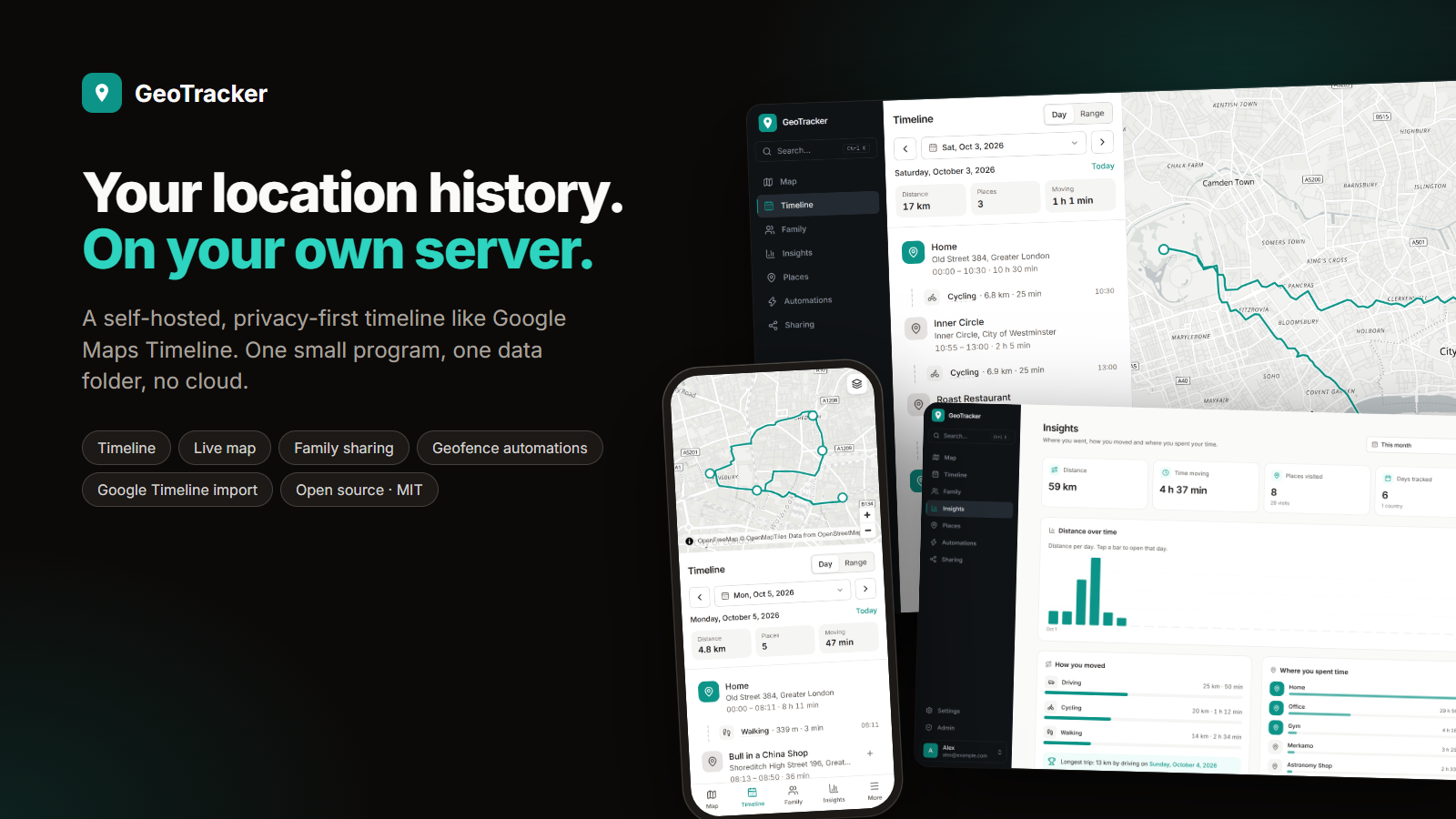
Visits and trips, Google Takeout import, geofencing automations and family sharing in one small program.
Why I built it
I liked Google Maps Timeline but not handing over every place I go. GeoTracker gives me the same timeline on my own server.
Architecture
How it fits together
Phones
OwnTracks, Overland
GPSLogger, Traccar
GeoTracker app
GeoTracker
Visit and trip detection
Geofencing automations
SQLite
You get
Timeline and live map
Family arrival alerts
Webhooks
Home Assistant, n8n
Screenshots
See it in use
Documentation
From the README
A self-hosted, privacy-first location timeline, like Google Maps Timeline, running on your own server as one small program. MIT licensed.
- Timeline: your days as visits and trips, detected automatically, with place names and transport modes.
- Live map: your current position, today's path, saved places and playback of any day.
- Bring your history: import Google Timeline (all three export formats), GPX, GeoJSON, CSV and OwnTracks files. Every import can be undone.
- Your data, your formats: export everything at any time (lossless archive, GPX, GeoJSON, CSV).
- Geofencing automations: when you arrive at or leave a place, tell family, call a webhook (Home Assistant, n8n, IFTTT) or message ntfy, Telegram, Discord or Slack.
- Family & sharing: family groups with arrival alerts, and expiring share links (live or a trip, exact or approximate).
- Insights: distance, time moving, places and countries over any period.
- Safe by default: daily automatic backups, a backup before every upgrade, one-click restore. Place names come from OpenStreetMap Nominatim unless you switch the geocoder to your own server or Off (see Configuration).
- More: single sign-on (OIDC), email and Gotify notifications, Immich photos on your timeline, offline maps, installable as an app.
- Lightweight: one process, one data folder, SQLite. No Redis, no separate database. Runs on a Raspberry Pi.
Phones send locations with apps you may already use: OwnTracks, Overland, Colota, GPSLogger or Traccar Client. Scan a QR code and you're done.
On Android there is also the native GeoTracker app (download the APK): it records, shows your timeline, insights and places, and works on its own without a server too. See android/.
Quick start
Docker (amd64, arm64, armv7):
mkdir -p data && sudo chown 65532:65532 data
docker run -d --name geotracker -p 8080:8080 -v ./data:/data --restart unless-stopped ghcr.io/anand34577/geotracker:0.5
Linux / Raspberry Pi (installs a systemd service):
curl -fsSL https://github.com/anand34577/geo-tracker/releases/latest/download/install.sh | sudo sh
macOS and Windows: download the program from the releases page and run it (instructions).
Open http://localhost:8080 and create your account. For real use (phones on mobile data) put it behind HTTPS: the Docker Compose + Caddy setup gives you automatic certificates in about ten minutes.
Documentation
Everything is in the wiki:
| Get started | Use GeoTracker | Run a server |
|---|---|---|
| Getting started | Connecting phones | Configuration |
| Install with Docker | User guide | Administration |
| Install the program | Automations | Single sign-on |
| HTTPS | API | Troubleshooting |
The wiki is generated from the docs/ folder. The product and architecture spec, with every design decision and its reason, is PROJECT_SPEC.md.
Development
Requirements: Go 1.26+, Node.js 22+. See Development.
make web        # build the UI once (the Go binary embeds web/dist)
make dev-api    # API + embedded UI on :8080
make dev-web    # hot-reloading UI on :5173, proxies the API to :8080
make check      # vet + tests + typecheck (what CI runs)
make build      # ./geotracker, a single static binary
| Folder | Contents |
|---|---|
cmd/geotracker | Entry point and command line |
internal/ | server, store, timeline, ingest, transfer, geocode, geo, maps, notify |
web/ | React + Vite + Tailwind UI, embedded into the binary |
deploy/ | Docker Compose, Caddy, nginx, systemd |
scripts/ | Linux install script |
docs/ | Wiki source |
Security
Report vulnerabilities privately: see SECURITY.md.
Self-hosted platforms