Apps & tools
StewardGet
A fast, modern download manager.
Multi-connection downloads, safe resume, browser capture and link refresh. Desktop app, TUI and CLI for Windows, macOS and Linux, with no telemetry.
Why I built it
Internet Download Manager set the bar, but it's Windows-only, closed source and nags for licences. I wanted its good parts on every OS, with smarter splitting and no slow assembling step at the end.
Architecture
How it fits together
Capture
Browser extension
Pasted link
CLI
Rust engine
Work-stealing scheduler
idle connections take half of the busiest range
Adaptive connections
backs off when a server limits them
Writes into the final file
no assembling step
Safe resume and link refresh
Use it from
Desktop app
egui
Terminal UI
ratatui
Command line
Screenshots
See it in use
Documentation
From the README
StewardGet
A fast, modern, open-source download manager — think IDM, rebuilt for today.
Desktop app · terminal UI · CLI · browser extension · Windows, macOS & Linux · zero telemetry
Formerly Velox: upgrading keeps your downloads, settings and extension.
Download · Features · Guide · How it works
Why StewardGet?
Internet Download Manager set the standard for segmented downloading, but it is Windows-only, closed source, nags for licences, has a dated UI, assembles files in a slow extra step, and its "refresh download address" flow is awkward. StewardGet keeps everything that made IDM great and fixes the rest.
| IDM | StewardGet | |
|---|---|---|
| Platforms | Windows | Windows, Linux, macOS, any terminal |
| Source / price | Closed, paid, serial nags | Open source (MIT/Apache-2.0), free |
| Segmented downloads | Static split + some re-splitting | Dynamic work-stealing: idle connections take half of the busiest range until the last byte |
| Finishing large files | Separate "assembling" step | None — every connection writes straight into the final file (sparse pre-allocation) |
| Servers that limit connections | Errors / stalls | Adaptive: failing extra connections back off, healthy ones take over their ranges |
| Expired links | Manual "refresh address" dialog | Refresh link: StewardGet opens the page, catches your next click in the browser and resumes the same file |
| Crash safety | Partial | Progress checkpointed every 3 seconds; partial data is never discarded without asking |
| Server file changed | Starts over silently | Stops and asks: resume anyway, refresh the link, or start over |
| Before downloading | Name and size only | Link check: real name, size, resume support, free disk space, duplicate warning |
| Integrity | — | MD5 / SHA-1 / SHA-256 / SHA-512 verification |
| Statistics | Minimal | Live graphs, per-download speed history, 30-day history, sources and categories |
| Automation | Limited | CLI, scriptable local API, terminal dashboard |
| Look | Windows 98 era | Five themes (System, Light, Dark, Midnight, Ocean), six accents, Inter font, interface zoom |
| Privacy | Phones home | No telemetry, no analytics, no update pings |
Features
Engine
- Multi-connection segmented downloads (1–32 per file) with dynamic splitting and work stealing.
- Pause / resume / restart, resume across restarts and crashes, re-add a link to continue its partial data.
- HTTP/1.1 by default so each segment gets its own TCP connection (HTTP/2 would multiplex them into one).
- Exponential back-off with jitter, stall detection, per-connection retries, adaptive connection count;
servers that say
Retry-After(429/503) are obeyed. - Automatic retry of failed downloads (network or server trouble) with growing pauses.
- Global, per-queue and per-download speed limits (token bucket), adjustable live, plus a different limit for set hours (e.g. slower during work hours).
- Queues: as many as you like, each with its own order, limit, speed cap and schedule (start/pause times, weekdays); times missed while the computer slept are caught up.
- Smart file names (
Content-Disposition, RFC 5987, URL, MIME type), safe names on every OS, no overwrites. - Your own categories (name + extensions) next to the built-in ones, a folder per category, checksum verification, original modification time preserved.
- When a file already exists: keep both or replace; optionally run a program after each download (virus scan, unpack) without a shell.
- Proxy (HTTP/HTTPS/SOCKS5), custom headers, cookies, referrer and user agent.
- Free-space check before downloading; "disk full" is reported clearly and can be retried.
Your data is safe
- Progress is checkpointed every 3 seconds, data first and then the record, so a crash or power cut loses at most a few seconds of work.
- Partial data is never thrown away silently: if the server's file changes or no longer supports resuming, StewardGet stops and offers Resume anyway, Refresh link or Start over.
- Removing a download keeps its partial data unless you choose to delete it, and adding the link again continues it.
- The download list has rolling backups; a damaged list is set aside and restored automatically.
Desktop app
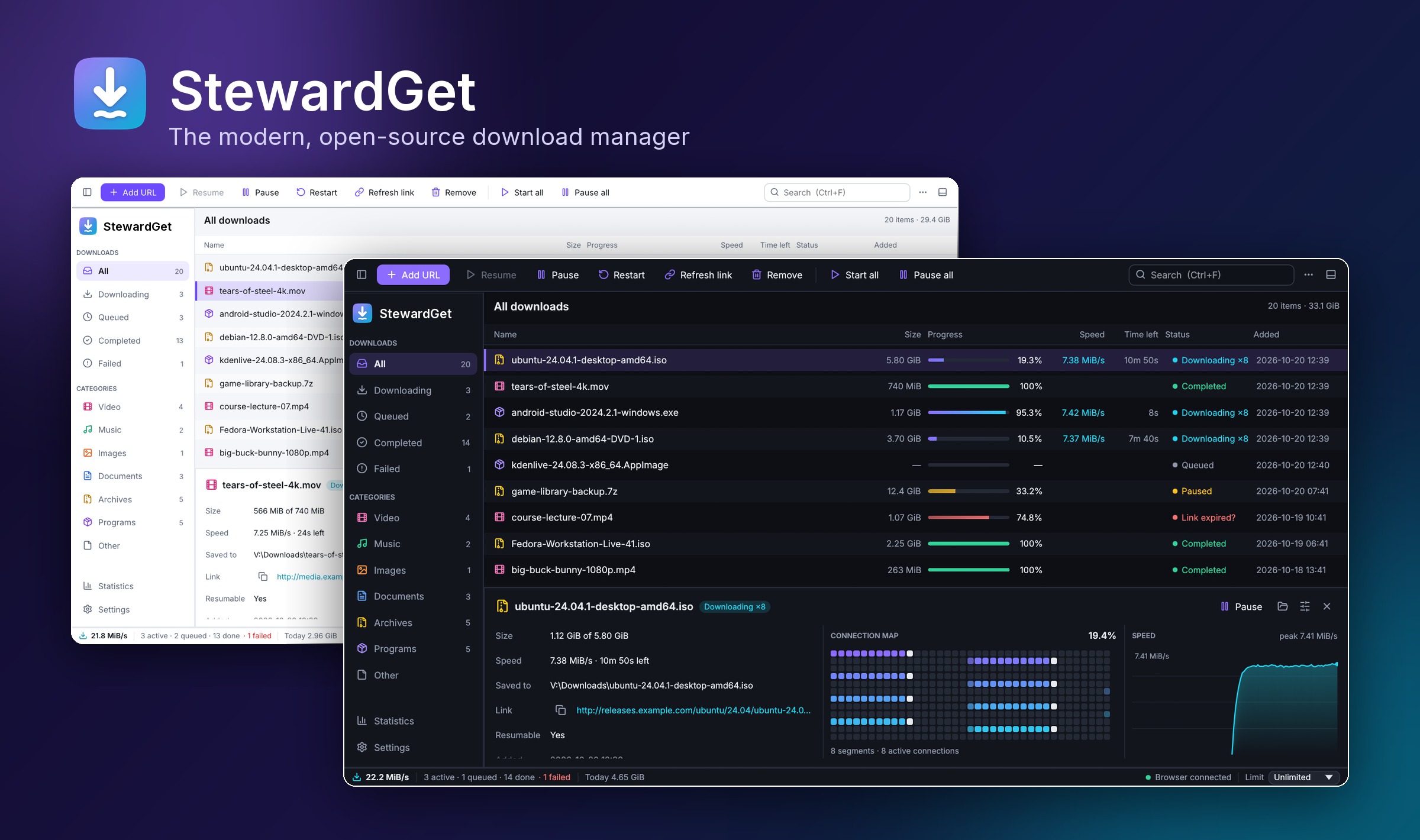
- IDM-style layout: category sidebar, action toolbar, dense sortable table, details pane with a live connection map and speed graph, status bar with total speed, browser status and limit picker.
- New-download window for browser downloads, like IDM's: name, size, resume support, folder, queue, then Download or Later. Lists of links get checkboxes and type filters.
- Add dialog with link check (real file name, size, resume support), free-space hint, duplicate detection,
batch patterns (
img[001-120].jpg), recent folders, "Download later". - Drag downloads onto a queue in the sidebar to move them; start and stop each queue on its own.
- Progress window for each download, like IDM's, also while StewardGet is in the tray: transfer rate, time left, resume support, each connection's progress, the parts, its own speed limit, Pause. It turns into Download complete when the file is done. Opens by itself for a download started on its own; double-click any download to open it.
- Properties (F2): rename or move files on disk, change link, connections, limits, headers, checksum.
- Clear problem messages with the right fix: refresh link, resume anyway, start over, move to another drive.
- Optional Download complete window for every finished download, "when all downloads finish" quit / sleep / shut down (with a countdown).
- Hash tool (MD5, SHA-1, SHA-256, SHA-512) for finished files; import and export link lists.
- Multi-select (Ctrl/Shift), context menus, keyboard shortcuts, double-click to open, clipboard monitoring.
- Five themes, six accent colours, interface zoom, Inter typeface and Lucide icons; fully responsive layout.
- First-run setup, optional start with your computer (minimised), keep running in the background when the window closes, and a single window: opening StewardGet again brings the running one forward.
- Tray icon (Windows) / menu-bar icon (macOS): minimise hides StewardGet there, with speed and quick actions; system notifications when downloads finish or fail; the window remembers its size and position; settings backup and restore.
- Site grabber: find the files linked from a page (optionally a few levels deep, honouring
robots.txt). - Warns about programs disguised as documents (
invoice.pdf.exe).
AI assistants (MCP)
- Optional MCP server (Settings › AI & automation, off by default): an assistant can add, list,
pause, resume, restart and remove downloads and set the speed limit. Local only, token protected, files
stay below your download folder, no settings changes and no programs run.
stewardget mcp --configprints the client settings.
Browser integration (Chrome, Edge, Brave, Opera, Vivaldi, Firefox)
- Guided setup in the app with a live "connected" status; the extension updates with the app.
- Takes over browser downloads, passing cookies, referrer and user agent, so logged-in downloads work.
- "Download with StewardGet" on any link, image, video or audio, and "Download all links with StewardGet" for a page.
- Video and audio on a page: the extension lists the media a page played (files and HLS streams);
StewardGet saves a stream as one
.tsor.mp4, decrypting AES-128 streams. Downloads that answer a form (POST) stay in the browser, since they can't be repeated. - Size, file-type and per-site filters, Alt+click to keep a download in the browser; falls back to the browser when StewardGet isn't running.
Terminal
stewardget— an interactive dashboard with the same features (works over SSH).stewardget get …— wget-style downloads with live multi-bar progress; Ctrl+C and re-run to resume.stewardget add …— hand URLs to the running app, to any queue;stewardget queueslists the queues.
Install
| System | One-click download | Notes |
|---|---|---|
| Windows 10/11 (x64 and ARM64) | StewardGet-Setup.exe | No administrator rights needed. Portable zip also available. |
| macOS 11+ (Apple silicon and Intel) | StewardGet-macos.dmg | Open it and drag StewardGet to Applications. |
| Debian, Ubuntu, Mint, Pop!_OS | x64 .deb · ARM64 .deb | sudo apt install ./stewardget-linux-x64.deb |
| Fedora, openSUSE, RHEL | x64 .rpm · ARM64 .rpm | sudo dnf install ./stewardget-linux-x64.rpm |
| Any Linux | install script below | Installs into ~/.local, no root needed. |
Or install from a terminal. The scripts pick the right build, verify its checksum and open StewardGet:
# Linux and macOS
curl -fsSL https://github.com/anand34577/stewardget/releases/latest/download/install.sh | sh
# Windows (PowerShell)
irm https://github.com/anand34577/stewardget/releases/latest/download/install.ps1 | iex
On first start, StewardGet asks where to save downloads, offers to start with your computer and walks you
through connecting your browser. The builds are not code-signed yet, so Windows and macOS show a
one-time warning for the downloaded installer; the
installation guide shows what to click.
SHA256SUMS.txt on the release page lists every file's checksum.
Uninstall from Windows Settings › Apps, by moving StewardGet to the Bin on macOS, with
sudo apt remove stewardget / sudo dnf remove stewardget, or with the install script's --uninstall option.
Your downloads and settings are kept unless you choose otherwise.
Browser extension
Open Settings › Browser in StewardGet. Pick your browser (Chrome, Edge, Brave, Opera, Vivaldi or Firefox)
and follow the three steps shown; the status turns green as soon as the extension connects. The app
keeps the extension folder up to date when StewardGet updates. From a terminal, stewardget extension prints
the same steps. Details: Browser extension guide.
Build from source
With a recent Rust toolchain (1.95+):
git clone https://github.com/anand34577/stewardget
cd stewardget
cargo build --release
Binaries land in target/release/ (stewardget-gui and stewardget).
Linux needs the usual windowing headers, e.g. on Debian/Ubuntu:
sudo apt install libxkbcommon-dev libwayland-dev libxcb-render0-dev libxcb-shape0-dev libxcb-xfixes0-dev libgl1-mesa-dev.
The scripts that build the installers and packages are in packaging/.
Using it
Refreshing an expired link
Signed links (cloud drives, file hosts, CDNs) often expire. When a download stops with HTTP 403/404/410 or “the remote file changed”:
- Select it and click Refresh link (or press w in the terminal UI).
- StewardGet opens the page the download came from and waits.
- Click the download button on that page again. The extension hands the new link to StewardGet, which recognises the same file (by size or name), swaps the link and continues from where it stopped.
You can also paste a new link directly (u in the terminal UI).
Keyboard shortcuts (desktop)
| Keys | Action |
|---|---|
| Ctrl+N | Add URLs |
| Ctrl+V | Paste links to add |
| Ctrl+O | Import links from a text file |
| Ctrl+F | Search |
| Space | Pause / resume selection |
| F2 | Properties |
| Delete / Shift+Delete | Remove / remove and delete files |
| Enter | Open completed file |
| Ctrl+A | Select all |
| Ctrl+, | Settings |
| Ctrl+Q | Quit StewardGet |
| Ctrl++ / Ctrl+- | Zoom |
Press ? in the terminal UI for its shortcuts.
CLI
stewardget get https://example.com/big.iso                        # download here
stewardget get -c 16 -l 5M -d ~/Downloads URL1 URL2               # 16 connections, 5 MiB/s cap
stewardget get --checksum sha256:9f86d0… URL                       # verify integrity
stewardget get -H "Cookie: session=abc" URL                        # custom headers
stewardget get -i links.txt                                        # read URLs from a file
stewardget add URL                                                 # queue in the running app
stewardget add --queue Night --paused URL                          # add to a queue, to start on its schedule
stewardget queues                                                  # list the queues
stewardget list [--json] | stewardget stats | stewardget config
stewardget pause all | stewardget resume 4 | stewardget remove 4 --delete-file
stewardget limit 2M                                                # cap the running app's speed
stewardget grab https://example.com/files/ -d 1 -e zip,iso --add   # find files on a page, add them
stewardget mcp --config                                            # settings for an MCP client
stewardget completions powershell                                  # shell completion script
stewardget extension --open                                        # set up the browser extension
Privacy
StewardGet has no telemetry, analytics, crash reporting or update checks. The only network traffic is
the downloads you start. The browser API listens on 127.0.0.1 only, rejects requests from web pages
and can require a token. Settings, the download list and statistics are plain JSON files in your
data directory (stewardget config shows where). For a portable install, put an empty file named portable
next to the executables (the Windows portable zip has one) or set STEWARDGET_DATA_DIR.
Project layout
crates/stewardget-core   download engine (library)
crates/stewardget-cli    `stewardget` — CLI and terminal UI (ratatui)
crates/stewardget-gui    `stewardget-gui` — desktop app (egui)
extension/          browser extension (Manifest V3), bundled into the apps
packaging/          installers, Linux packages, macOS app bundle, install scripts
docs/               architecture notes
See docs/ARCHITECTURE.md for how the engine works.
Apps & tools