Edge AI & hardware
socmon
btop for Rockchip and Allwinner boards.
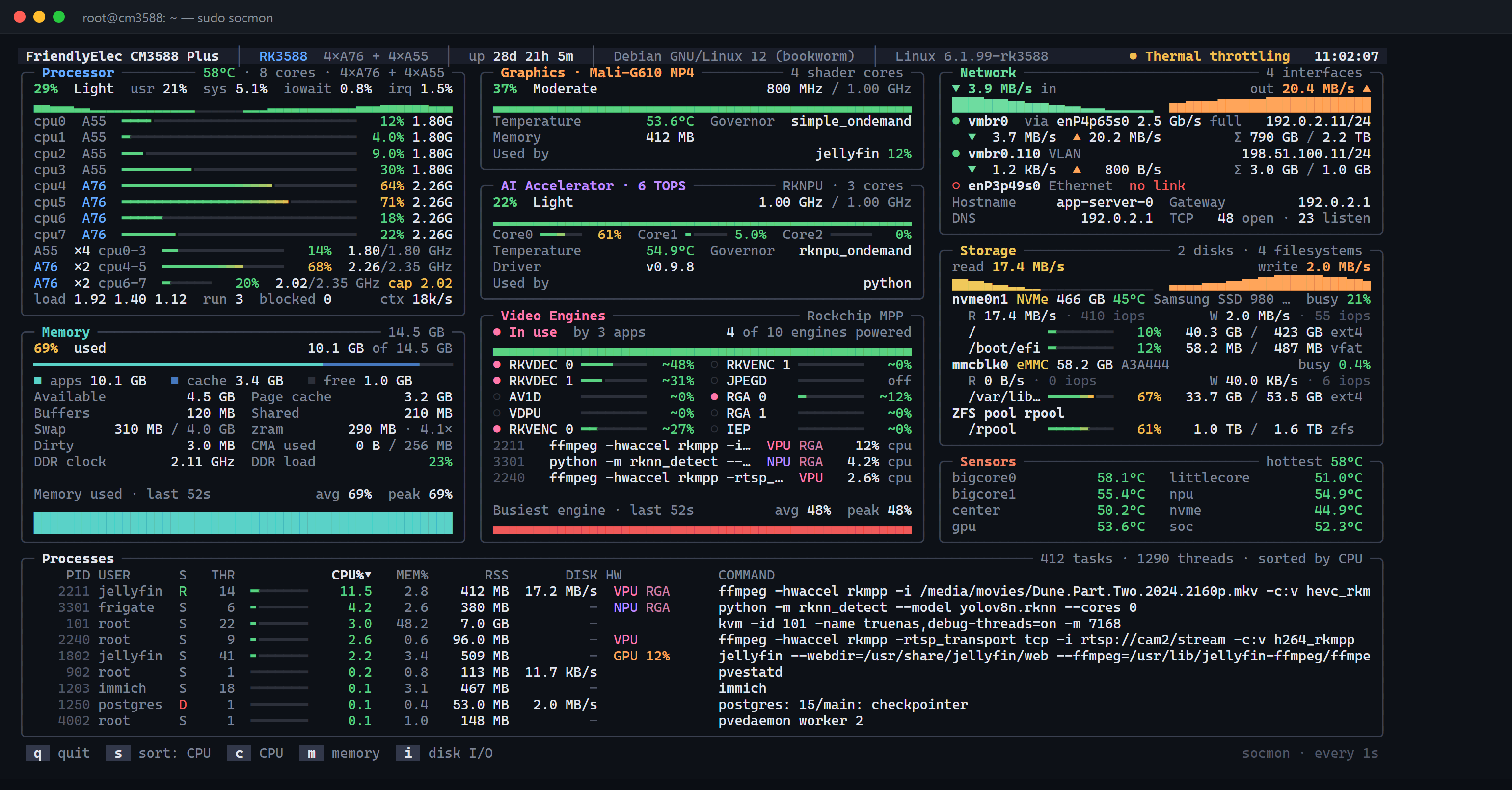
Live dashboard for CPU clusters, GPU, NPU, video engines and thermals, plus the exact process using each one. Single static Go binary.
Why I built it
htop shows the CPU, but not whether the NPU is idle while my model 'runs', or whether ffmpeg is really using the hardware decoder. I wanted to see that at a glance.
Architecture
How it fits together
Kernel
/proc and cpufreq
NPU, VPU and RGA drivers
hwmon and thermals
socmon
Per-process attribution
which process uses which engine
Terminal
CPU clusters
GPU and NPU load
Video engines
Thermals and throttling
Screenshots
See it in use
Documentation
From the README
A btop-style live dashboard for Rockchip and Allwinner boards.
CPU clusters, GPU, NPU, video engines, thermals — and the exact process using each one.
Rendered from the synthetic RK3588 fixture in render_test.go (-frame output), not a live capture.
Why socmon
htop shows you the CPU. It can't tell you whether ffmpeg is really using the hardware decoder, whether the NPU is idle while your model "runs", or whether the kernel has quietly capped your big cores. socmon reads the SoC-specific counters (devfreq, debugfs, runtime-PM, DRM fdinfo) and joins them with /proc, so each accelerator card shows load, clock, temperature and which apps hold it open.
| You want to know… | socmon shows |
|---|---|
| Is Jellyfin / go2rtc using RKMPP or the CPU? | Video Engines card + VPU / RGA tags on the process |
| Is my RKNN model actually on the NPU? | Per-core NPU load, driver version, process tagged NPU |
| Am I thermally throttled? | Header health badge, cap marker on throttled clusters, cooling states |
| Where is memory going? | Apps / cache / free bar, zram ratio, CMA, DDR clock and bus load |
| What is saturating the box? | Per-disk busy %, IOPS, per-interface rates, per-process disk I/O |
Supported hardware
| SoC | Recognized boards (by name) | CPU | GPU | NPU |
|---|---|---|---|---|
| RK3588 | ROCK 5A/5B, CM3588 | 4×A76 + 4×A55 | Mali-G610 MP4 | RKNPU, 6 TOPS, 3 cores |
| RK3576 | — | 4×A72 + 4×A53 | Mali-G52 MC3 | RKNPU, 6 TOPS, 2 cores |
| RK3566 / RK3568 | ROCK 3A / 3C | 4×A55 | Mali-G52 2EE | RKNPU, 0.8 TOPS |
| Allwinner A733 | Radxa Cubie A7A / A7S | 2×A76 + 6×A55 | IMG BXM-4-64 | VIP9000, 3 TOPS |
| Allwinner A527/T527 | Radxa Cubie A5E | 8×A55 | Mali-G57 MC1 | VIP, 2 TOPS |
Unknown boards still get the generic CPU, memory, network, storage, sensor and process panels; accelerator cards say "not detected".
Features
- Processor — total % with usr/sys/iowait/irq split and history, every core (type, load, clock), each cpufreq cluster with a
capmarker whenscaling_max_freqis lowered, governor, load average, run queue, blocked tasks, context switches - Memory — apps/cache/free stacked bar, available, page cache, buffers, shared, dirty, swap, zram size and ratio, CMA, DDR clock and bus load (Rockchip dmc), DDR temperature
- Graphics — load + history, clock vs max, governor, temperature, shader cores, GPU memory, apps using the GPU (per-app GPU % on Panfrost/Panthor via DRM fdinfo)
- AI Accelerator — load, per-core bars, clock, governor, temperature, memory, driver version, loaded models with inferences/s and latency (Allwinner viplite)
- Video Engines — RKVDEC, RKVENC, VDPU, VEPU, AV1D, JPEG, RGA, IEP (Rockchip MPP), Cedar VE (Allwinner), Hantro/rkvdec (mainline V4L2): powered state, busy %, and the processes holding
/dev/mpp_service,/dev/rga,/dev/cedar_devor a V4L2 codec node - Network — physical ports, bridges, bonds, VLANs, Wi-Fi: link speed, duplex, signal, IPv4, rates, totals, errors/drops, driver, MAC; gateway, DNS, TCP open/listening
- Storage — NVMe/eMMC/SD/USB/SATA with size, model, temperature, busy %, MB/s, IOPS, filesystems with usage bars; ZFS pools
- Sensors — every thermal zone, fans (rpm/duty), throttling from cooling devices
- Processes — PID, user, state, threads, CPU % (share of the whole chip), MEM %, RSS, disk I/O, hardware blocks in use, GPU %, full command line
- Scriptable — JSON snapshot via
-once(automatic when output isn't a TTY) and single-frame rendering via-frame
Adaptive layout
The layout reflows to the terminal: 3 columns at ≥150 cols, 2 at ≥96, 1 below, with two process tables side by side on very wide screens. The last card in each column turns spare rows into a history chart, so no area is blank; on short terminals the least important cards (Sensors, Storage, Network) give up rows first and at least ~10 processes stay visible.
Same data in an 80-column terminal.
Quick start
Download the prebuilt binary from the latest release, verify it, and run it as root:
curl -LO https://github.com/anand34577/socmon/releases/latest/download/socmon-linux-arm64
curl -LO https://github.com/anand34577/socmon/releases/latest/download/socmon-linux-arm64.sha256
sha256sum -c socmon-linux-arm64.sha256
chmod +x socmon-linux-arm64 && sudo ./socmon-linux-arm64
Releases are built by GitHub Actions when a v* tag is pushed. To build it yourself instead:
# 1. build for the board (from any OS with Go)
GOOS=linux GOARCH=arm64 CGO_ENABLED=0 go build -trimpath -ldflags "-s -w" -o socmon-linux-arm64 .

# 2. copy it over and run as root
scp socmon-linux-arm64 user@board:~/
ssh -t user@board 'chmod +x socmon-linux-arm64 && sudo ./socmon-linux-arm64'
Root is needed for NPU/GPU load and accelerator ownership (root-only debugfs and /proc//fd). Without it socmon still runs and marks those readings unavailable.
Usage
sudo ./socmon              # live dashboard
./socmon -i 2s             # refresh every 2 s (default 1s)
./socmon -once             # one JSON snapshot, then exit
./socmon -frame 180x50     # print one frame at 180x50 and exit
| Flag | Meaning |
|---|---|
-i | Refresh interval, e.g. 500ms, 2s (default 1s) |
-once | Print one JSON snapshot and exit (process list omitted) |
-frame WxH | Render one frame at the given size and exit (min 40×10) |
-color | auto (default, trusts $COLORTERM), true (24-bit) or 256 |
Keys
| Key | Action |
|---|---|
q | Quit (also Ctrl-C) |
s | Cycle process sort |
c | Sort by CPU |
m | Sort by memory |
i | Sort by disk I/O |
Resizing and key presses repaint without resampling, so they never skew rate calculations.
Scripting
sudo ./socmon -once | jq '{soc: .board.soc, load: .loadavg, accelerators: .accelerators}'
./socmon -frame 160x45 > frame.ans && cat frame.ans          # share a frame in a bug report
Building from source
Requires Go 1.21+. All sources carry a //go:build linux tag, so always build for Linux.
# on the board
go build -trimpath -ldflags "-s -w" -o socmon .
# cross-compile from Windows PowerShell
$env:GOOS="linux"; $env:GOARCH="arm64"; $env:CGO_ENABLED="0"
go build -trimpath -ldflags "-s -w" -o socmon-linux-arm64 .
How it works
| Area | Source |
|---|---|
| CPU / memory | /proc/stat, /proc/meminfo, /proc/loadavg, cpufreq |
| Disk / network | /proc/diskstats, /sys/block, /proc/mounts, /proc/net/{dev,tcp}, /sys/class/net |
| Processes | /proc//{stat,io,fd,fdinfo,cmdline} |
| Temps / fans | thermal zones, cooling devices, hwmon |
| GPU / NPU / DDR | /sys/class/devfreq (matched by name); debugfs rknpu/load+version, mali0/gpu_memory, pvr, viplite, clk |
| Video engines | /sys/bus/platform/devices media blocks, MPP/RGA debugfs |
| Board / SoC | /proc/device-tree/{model,compatible} |
Where the kernel exposes no load counter the card says so and shows the clock instead. Estimates are marked ~: media-block busy % and the A733 GPU load are the share of time the block was runtime-resumed (power/runtime_active_time). That is accurate for drivers that suspend between jobs; a block that never suspends reports "on" rather than a fake 100%.
Allwinner A733 notes (verified on Radxa Cubie A7A, BSP kernel)
- GPU (PowerVR BXM-4-64) — no devfreq node and no "GPU Utilisation" in
pvr/status. Load is approximated as runtime-PM powered-on time; clock from debugfsclk/gpu0; memory frompvr/driver_stats - NPU (VIP9000, viplite) — load + state from
viplite/core_loading, memory frommem_profile, per-model inferences/s and latency fromrt_net_profile; clock from devfreq3600000.npu - DDR — devfreq
a020000.dmcfreq(clock only). Video decode runs on the VE, not the GPU - Thermal —
*_idle_zoneentries duplicate the CPU sensors and are hidden
Troubleshooting
Missing or wrong readings? Run the read-only diagnostics script as root on the board and attach the output to your report:
sudo bash scripts/socmon-diag.sh > "$(hostname)-diag.txt" 2>&1
It only lists and reads sysfs/procfs/debugfs files (cpufreq, devfreq, GPU, NPU, media blocks, thermal…).
| Symptom | Likely cause |
|---|---|
| NPU/GPU load missing, apps not listed | Not running as root, or debugfs not mounted (mount -t debugfs none /sys/kernel/debug) |
| Colours look faded / flat | socmon only uses 24-bit colour when $COLORTERM says so; sudo and many SSH sessions drop it, so it falls back to a coarser 256-colour palette. Run sudo ./socmon -color true (or sudo -E) on a 24-bit terminal |
| Card shows clock but no load | The kernel driver exposes no load counter for that block |
Project layout
| File | Responsibility |
|---|---|
main.go | Entry point, flags, event loop, refresh ticker, key and signal handling |
collect.go | Collector and Snapshot; CPU, cluster, core and memory sampling |
accel.go | GPU/NPU/DDR discovery (devfreq, viplite, Mali memory) and media-block (VPU/RGA) sampling |
io.go | Disks, mounts, network interfaces, TCP counts, thermal/fan/cooling sensors |
procs.go | Process scan, CPU%/I/O rates, open-fd classification into hardware blocks |
soc.go | SoC profiles and board-name detection from the device tree |
panels.go | Card bodies: CPU, memory, graphics, AI accelerator, video, network, storage, sensors |
ui.go | Colour, formatting helpers, layout and frame rendering |
term.go | Raw mode, terminal size, TTY detection |
sysfs.go | Small sysfs read helpers |
.github/workflows/ | ci.yml (fmt, vet, test, build on every push/PR) and release.yml (builds and publishes binaries on v* tags) |
docs/ | README images (banner.svg, hero.png, compact.png) |
scripts/ | socmon-diag.sh, the read-only diagnostics collector |
Edge AI & hardware